
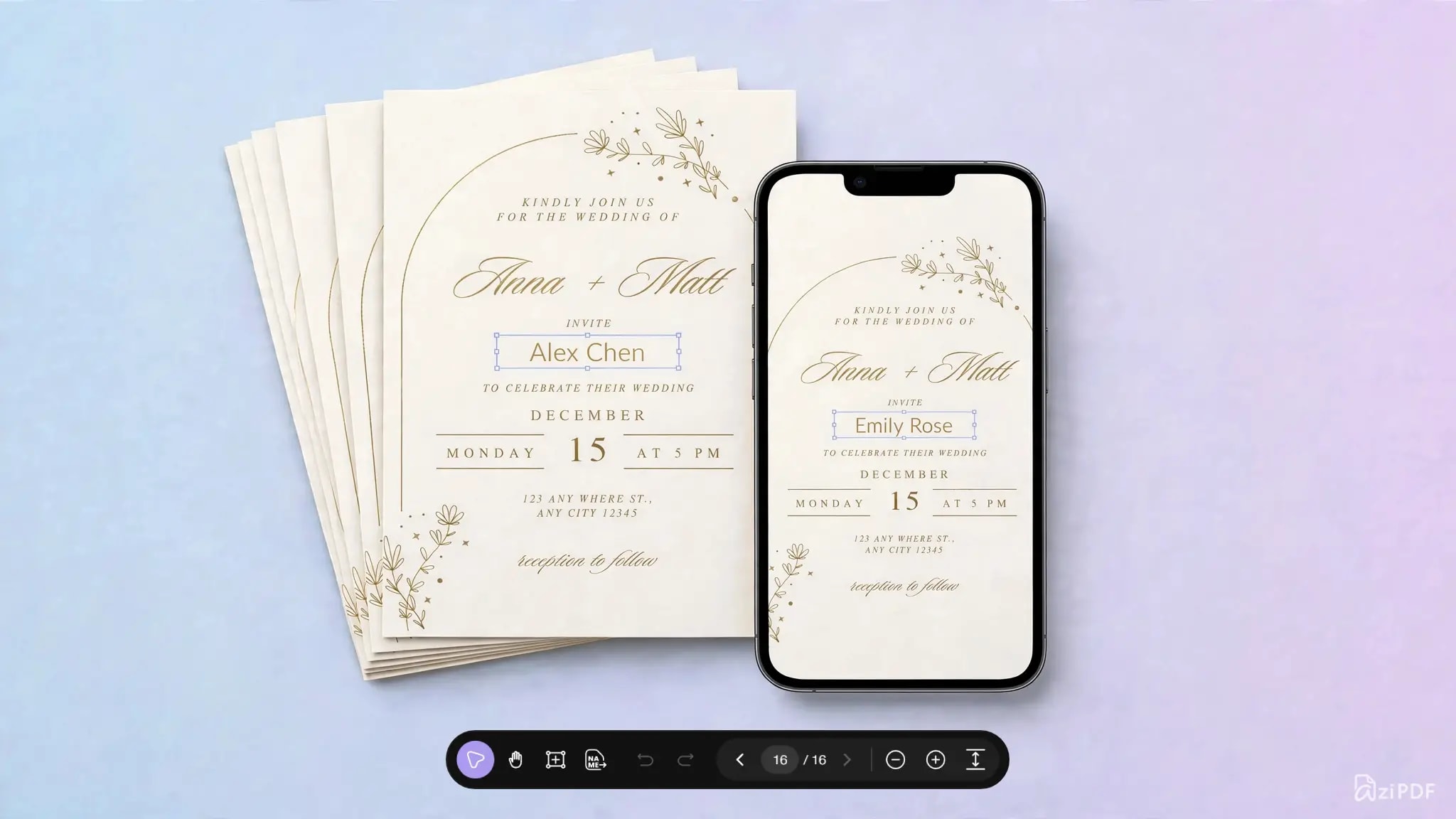

We are thrilled to announce the launch of our new AziPDF Bulk PDF Exporter today. With this new feature, you can now create invitation card bulk PDF exports with personalized names and generate unlimited PDF cards in just a few steps. Be it a single card or several custom-made invitation cards, all that can be done much quicker and easier with the help of AziPDF.
Preparing a hundred of custom invitation cards may require a lot of time, especially if you have to make all the modifications for each invitation card separately. Whether you are making wedding invitations, event invitations, party cards, business invitations or certificates, typing each person's name separately can get pretty boring very soon.
However, with the help of the brand new AziPDF Bulk PDF function, you will be able to save a considerable amount of time.
All you need is to prepare your file first, upload the data and make your personalized PDF files in bulk.
Easily Personalize Hundreds of Invitation Cards
Suppose that you have one invitation card that is designed as a PDF and one Excel file with the names of all your invitees.
For example, your Excel file may contain:
- •Rahul Patel
- •Priya Shah
- •Amit Mehta
- •Neha Desai
- •Rohan Joshi
Without having to open your invitation PDF and change the name in the invitation for every invitee, you will be able to do this easily using AziPDF Bulk PDF tool.
Simply add your PDF invitation template, upload your file, choose places for personalizing and create customized PDF documents.
This is much easier when there is a long list of invitees.
Create Personalized Wedding Invitations
Wedding invitations are one of the most useful applications for bulk PDF personalization.
If you are inviting hundreds of guests, adding every guest's name manually can take hours. With a reusable invitation template and a list of names, you can create personalized invitation PDFs for your entire guest list.
You can use the same workflow for:
- •Wedding invitations
- •Engagement invitations
- •Birthday invitations
- •Anniversary invitations
- •Reception invitations
- •Religious events
- •Family functions
- •Festival invitations
- •Corporate events
Create your design once and personalize the details for each recipient without repeatedly editing the original PDF.
Convert Your Excel Sheet into Custom PDFs
It is much simpler to handle a long list of names if your data is organized in Excel.
With AziPDF Bulk PDF, you have the ability to leverage your Excel sheet to aid in the personalization of several PDF documents. The content you want to include in your PDF could be included in your Excel sheet.
This is especially useful for situations where you want to generate many customized documents based on one PDF template.
Rather than performing copy-and-paste operations, you can automate the process and save time.
Create a Variety of PDFs Using One PDF Template
The main benefit of mass personalization PDF files is that you do not have to create each document individually.
It is possible to begin with one PDF template and use it as the basis for all your batch.
For example:
One PDF invitation template + Guest list = Personalized PDF invitations
This approach is time-saving and helps keep the same design for all your invitations.
Each PDF file will contain personalized data for the desired area of your template.
Perfect for Large Events and Guest Lists
When you have only a few invitations, manual editing may be manageable. But when your guest list grows to hundreds or thousands of names, the process becomes difficult and time-consuming.
A bulk PDF workflow is useful for:
- •Large weddings
- •Corporate events
- •Conferences
- •Seminars
- •School events
- •Community programs
- •Religious gatherings
- •Birthday celebrations
- •Award ceremonies
- •Business invitations
Whether you are an event organizer, designer, business owner, or someone planning a large celebration, bulk PDF personalization can help simplify repetitive PDF creation.
Save Time on Repetitive PDF Editing
Manually creating personalized PDFs often means repeating the same steps again and again.
Open the PDF.
Change the name.
Save the file.
Open the next PDF.
Change the next name.
Save again.
When you have hundreds of recipients, this workflow can become frustrating.
AziPDF Bulk PDF helps make this process more efficient by allowing you to work with a reusable PDF template and a list of personalized data.
You can spend less time repeating the same editing tasks and more time focusing on your event or project.
Maintain Your Original Invitation Design
The design of your invitation plays an important role as well. Various aspects like fonts, images, color scheme, layout and more are involved in making it look perfect.
With a personalized bulk workflow, you can make use of your current PDF invitation as the template and include personalized details wherever needed.
This will help you to design your invitation once and reuse it to create multiple personalized PDF documents.
More Than Just Invitation Cards
Although personalized invitations are a great use case, bulk PDF creation can be useful for many other types of documents.
You can use a similar workflow for:
Certificates
Create personalized certificates for students, employees, participants, or award recipients.
Event Documents
Prepare personalized documents for conferences, seminars, workshops, and other events.
Business Documents
Generate repeated business documents that require different names or information for each recipient.
School and College Documents
Create personalized certificates, invitations, notices, or other PDF documents for students and participants.
Marketing Materials
Prepare personalized PDF flyers, promotional documents, or event materials for different customers or recipients.
Personalized Letters
Create multiple letters using the same PDF design while changing the recipient information for each person.
How to Create Personalized PDFs in Bulk
Creating multiple personalized PDFs with AziPDF is designed to be simple and can be done in just four clicks.

Step 1: Add Your PDF Card
Add your PDF invitation card and the data file of Excel or CSV to the AziPDF Bulk PDF tool.
Step 2: Select the Personalization Area
Choose where the personalized information should appear on your PDF.
Step 3: Generate Your PDFs
Start the bulk PDF generation process and create your personalized PDF files from the same template.
Step 4: Download Your Personalized Files
Once processing is complete, download your generated PDF files and use them for sharing, printing, or distribution.
Why Use AziPDF Bulk PDF?
AziPDF Bulk PDF is designed for anyone who needs to create multiple personalized PDF documents without editing every file individually.
With a bulk workflow, you can:
- •Create multiple personalized PDFs from one template
- •Personalize invitation cards with individual names
- •Work with large lists of recipients
- •Reduce repetitive copy-and-paste work
- •Keep your PDF design consistent
- •Create documents for events, businesses, schools, and organizations
- •Save time when working with large batches of PDFs
Create Your Personalized Invitation PDFs Faster
Sending out customized invitations can sometimes take time due to repetition involved in the process, especially if you have many people invited to the event.
Using AziPDF Bulk PDF, you can make the task simpler by beginning with one PDF design and then utilizing your name list or data in order to make various personalized PDF files.
If you need to create wedding invitations for your guests, participant certificates, or any other kind of personalized documents for your business, bulk PDF generator can assist you in doing so.
Try AziPDF Bulk PDF today and make creating personalized PDF invitations and documents easier.
Create once. Personalize in bulk. Save time.
Start creating your personalized PDF files with AziPDF Bulk PDF.
Creating Invitations One at a Time? There’s an Easier Way.
Try Bulk CreationSafe in our hands
AziPDF takes your privacy seriously. Remember that...